> ## Documentation Index
> Fetch the complete documentation index at: https://dripart-chore-sync-comfy-api-v2-spec-12fd5b4.mintlify.site/llms.txt
> Use this file to discover all available pages before exploring further.
# ComfyUI Wan2.1 Fun InP 视频示例
> 本文介绍了如何在 ComfyUI 中完成 Wan2.1 Fun InP 视频首尾帧视频生成示例
## 关于 Wan2.1-Fun-InP
**Wan-Fun InP** 是阿里巴巴推出的开源视频生成模型,属于 Wan2.1-Fun 系列的一部分,专注于通过图像生成视频并实现首尾帧控制。
**核心功能**:
* **首尾帧控制**:支持输入首帧和尾帧图像,生成两者之间的过渡视频,提升视频连贯性与创意自由度。相比早期社区版本,阿里官方模型生成的结果更稳定,质量也显著更高。
* **多分辨率支持**:支持生成 512×512、768×768、1024×1024 等分辨率的视频,适配不同场景需求。
**模型版本**:
* **1.3B** 轻量版:适合本地部署和快速推理,**显存要求较低**
* **14B** 高性能版:模型体积达 32GB+,效果更优,但需要**更高显存**
下面是相关模型权重和代码仓库:
* [Wan2.1-Fun-1.3B-Input](https://huggingface.co/alibaba-pai/Wan2.1-Fun-1.3B-Input)
* [Wan2.1-Fun-14B-Input](https://huggingface.co/alibaba-pai/Wan2.1-Fun-14B-Input)
* 代码仓库:[VideoX-Fun](https://github.com/aigc-apps/VideoX-Fun)
目前 ComfyUI 已原生支持 Wan2.1 Fun InP 模型。在开始本篇教程之前,请更新你的 ComfyUI,确保你的版本在[这个提交](https://github.com/Comfy-Org/ComfyUI/commit/0a1f8869c9998bbfcfeb2e97aa96a6d3e0a2b5df)之后。
请确保你的 ComfyUI 已经更新。
* [ComfyUI 下载](https://www.comfy.org/download)
* [ComfyUI 更新教程](/zh/installation/update_comfyui)
本指南里的工作流可以在[工作流模板](/zh/interface/features/template)中找到。如果找不到,可能是 ComfyUI 没有更新。
如果加载工作流时有节点缺失,可能原因有:
1. 你用的不是最新版(每夜版)。
2. 启动时有些节点导入失败。
* [Cloud](https://cloud.comfy.org) 会在 ComfyUI 稳定版本发布后更新。
所以,如果你发现本文档中有任何核心节点缺失,可能是因为新核心节点尚未在最新稳定版中发布。请等待下一个稳定版发布。
## Wan2.1 Fun InP 工作流
### 1. 下载工作流
下载下面的图片,并将其拖入 ComfyUI 以加载工作流:

在 Comfy Cloud 中打开
下载 JSON,或在模板库中搜索“Wan 2.1 Inpainting”
视频生成的起始帧。下载并使用此图像,或替换为你自己的图像。
视频生成的结束帧。下载并使用此图像,或替换为你自己的图像。
### 2. 手动安装模型
如果自动下载模型无效,请手动下载模型并保存到对应的文件夹。
本指南涉及的全部模型都可以在 [Wan\_2.1\_ComfyUI\_repackaged](https://huggingface.co/Comfy-Org/Wan_2.1_ComfyUI_repackaged) 和 [Wan2.1-Fun](https://huggingface.co/collections/alibaba-pai/wan21-fun-67e4fb3b76ca01241eb7e334) 中找到。
**扩散模型**:请选择 1.3B 或 14B。14B 版本的文件大小更大(32GB),对显存的要求也更高:
`models/diffusion_models/wan2.1_fun_inp_1.3B_bf16.safetensors`
`models/diffusion_models/Wan2.1-Fun-14B-InP.safetensors`(下载后重命名)
**文本编码器**:请选择以下模型之一(fp16 精度的文件大小更大,对性能要求更高):
`models/text_encoders/umt5_xxl_fp16.safetensors`
`models/text_encoders/umt5_xxl_fp8_e4m3fn_scaled.safetensors`
**VAE**
`models/vae/wan_2.1_vae.safetensors`
**CLIP 视觉**
`models/clip_vision/clip_vision_h.safetensors`
文件保存位置:
```
📂 ComfyUI/
├── 📂 models/
│ ├── 📂 diffusion_models/
│ │ ├── wan2.1_fun_inp_1.3B_bf16.safetensors
│ │ └── Wan2.1-Fun-14B-InP.safetensors
│ ├── 📂 text_encoders/
│ │ ├── umt5_xxl_fp16.safetensors
│ │ └── umt5_xxl_fp8_e4m3fn_scaled.safetensors
│ ├── 📂 vae/
│ │ └── wan_2.1_vae.safetensors
│ └── 📂 clip_vision/
│ └── clip_vision_h.safetensors
```
### 3. 按步骤完成工作流
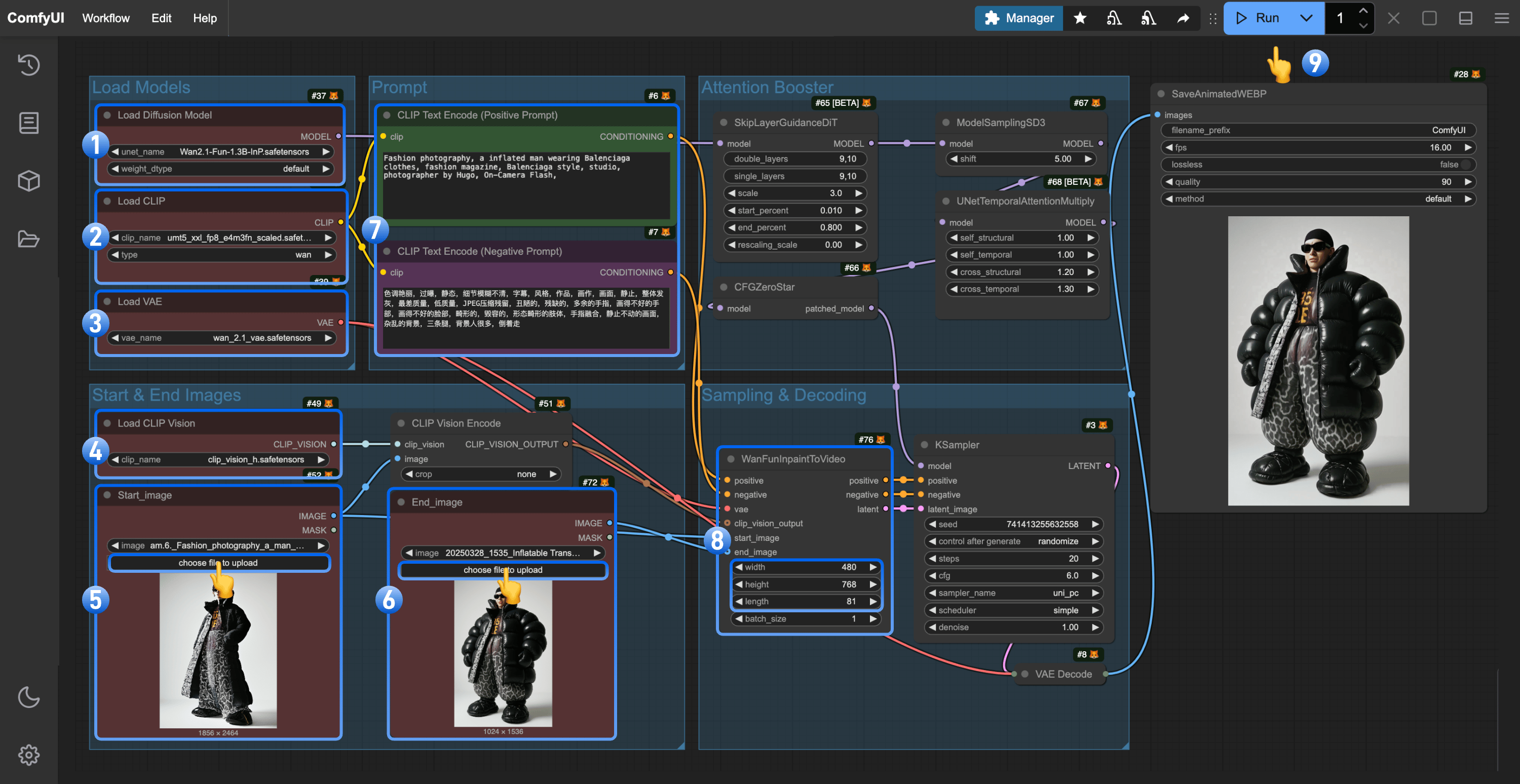 1. 确保 `Load Diffusion Model` 节点已加载 `wan2.1_fun_inp_1.3B_bf16.safetensors`
2. 确保 `Load CLIP` 节点已加载 `umt5_xxl_fp8_e4m3fn_scaled.safetensors`
3. 确保 `Load VAE` 节点已加载 `wan_2.1_vae.safetensors`
4. 确保 `Load CLIP Vision` 节点已加载 `clip_vision_h.safetensors`
5. 将起始帧上传到 `Load Image` 节点(已重命名为 `Start_image`)
6. 将结束帧上传到第二个 `Load Image` 节点
7. (可选)修改提示词(中英文均支持)
8. (可选)在 `WanFunInpaintToVideo` 中调整视频尺寸,避免使用过大的尺寸
9. 点击 `Run` 按钮,或使用快捷键 `Ctrl(cmd) + Enter` 执行视频生成
### 4. 工作流说明
请确保使用正确的模型,因为 `wan2.1_fun_inp_1.3B_bf16.safetensors` 和 `wan2.1_fun_control_1.3B_bf16.safetensors` 保存在同一文件夹中,且名称非常相似。请确认你使用的是正确的模型。
* 使用 Wan Fun InP 时,你可能需要频繁修改提示词,以确保相应场景转换的准确性。
## 其它 Wan2.1 Fun Inp 或者视频相关自定义节点
* [ComfyUI-VideoHelperSuite](https://github.com/Kosinkadink/ComfyUI-VideoHelperSuite)
* [ComfyUI-WanVideoWrapper](https://github.com/kijai/ComfyUI-WanVideoWrapper)
* [ComfyUI-KJNodes](https://github.com/kijai/ComfyUI-KJNodes)
1. 确保 `Load Diffusion Model` 节点已加载 `wan2.1_fun_inp_1.3B_bf16.safetensors`
2. 确保 `Load CLIP` 节点已加载 `umt5_xxl_fp8_e4m3fn_scaled.safetensors`
3. 确保 `Load VAE` 节点已加载 `wan_2.1_vae.safetensors`
4. 确保 `Load CLIP Vision` 节点已加载 `clip_vision_h.safetensors`
5. 将起始帧上传到 `Load Image` 节点(已重命名为 `Start_image`)
6. 将结束帧上传到第二个 `Load Image` 节点
7. (可选)修改提示词(中英文均支持)
8. (可选)在 `WanFunInpaintToVideo` 中调整视频尺寸,避免使用过大的尺寸
9. 点击 `Run` 按钮,或使用快捷键 `Ctrl(cmd) + Enter` 执行视频生成
### 4. 工作流说明
请确保使用正确的模型,因为 `wan2.1_fun_inp_1.3B_bf16.safetensors` 和 `wan2.1_fun_control_1.3B_bf16.safetensors` 保存在同一文件夹中,且名称非常相似。请确认你使用的是正确的模型。
* 使用 Wan Fun InP 时,你可能需要频繁修改提示词,以确保相应场景转换的准确性。
## 其它 Wan2.1 Fun Inp 或者视频相关自定义节点
* [ComfyUI-VideoHelperSuite](https://github.com/Kosinkadink/ComfyUI-VideoHelperSuite)
* [ComfyUI-WanVideoWrapper](https://github.com/kijai/ComfyUI-WanVideoWrapper)
* [ComfyUI-KJNodes](https://github.com/kijai/ComfyUI-KJNodes)